Claude Code AWS Gateway
Self-hosted API gateway for Claude Code on Amazon Bedrock
Claude Code AWS Gateway (CCAG)




A purpose-built gateway for running Claude Code through Amazon Bedrock. Deploy once, then give every developer on your team a single command to get connected.
For admins: Real-time budget controls, multi-account routing for latency optimization and data sovereignty, OIDC SSO, and a full analytics dashboard — all from a built-in portal.
For developers: One-command onboarding. No AWS credentials, no config files. A self-service portal shows personal usage metrics, budget consumption, and virtual key management.
For automation: A management CLI (ccag) for scripting key provisioning, team setup, and budget enforcement. Webhook, SNS, and EventBridge integrations for piping budget alerts and events into your existing tools.
100% open source, every feature included. No enterprise tier, no feature gates, no per-seat pricing.
Why CCAG?
When Claude Code connects to Bedrock directly (CLAUDE_CODE_USE_BEDROCK=1), it operates in a reduced-capability mode — extended thinking, web search, and some tool use features are disabled on the client side. CCAG presents as the Anthropic Messages API, so Claude Code enables its full feature set while inference still runs through your AWS account.
| Direct Bedrock | Through CCAG | |
|---|---|---|
| Extended thinking | No | Yes |
| Tool use | Partial | Yes |
| Web search | No | Yes (DuckDuckGo, Tavily, Serper, or custom per user) |
| Multi-account/region routing | N/A | Pool quota across accounts, regions, and teams |
| Budget controls | N/A | Per-user and per-team limits (notify, throttle, or block) |
| Developer onboarding | Manual config | One-command setup via portal Connect page |
| SSO authentication | N/A | OIDC with any provider (Okta, Azure AD, Google, etc.) |
| Admin portal | N/A | Built-in SPA with real-time analytics |
Architecture
graph LR
    CC[Claude Code] -->|Anthropic Messages API| CCAG[CCAG]
    CCAG -->|Bedrock Runtime API| BR[Amazon Bedrock]
    CCAG -->|Keys, teams, spend| RDS[(Postgres)]
    CCAG -->|Web search| DDG[DuckDuckGo]

    style CCAG fill:#f9f,stroke:#333,stroke-width:2px
Claude Code connects to CCAG as it would to the Anthropic API. The gateway translates requests to Bedrock format, handles SSE streaming, and maps model IDs. No client-side changes are needed.
Portal
Getting Started
Prerequisites
- AWS account with Bedrock model access enabled for Claude models
- AWS CLI configured with credentials
- Docker
Option A: Docker Compose
Suitable for solo users, small teams, or evaluation.
cd claude-code-aws-gateway
cp .env.example .env
# Edit .env: set AWS_REGION and AWS credentials (AWS_PROFILE or access keys)
docker compose up -d
The gateway starts at http://localhost:8080. Log in at http://localhost:8080/portal with the default admin credentials (admin/admin) to create API keys and manage users.
If port 8080 is already in use: GATEWAY_PORT=9080 docker compose up -d
If port 5432 is already in use: POSTGRES_PORT=5488 docker compose up -d
Option B: AWS CDK (ECS Fargate + RDS)
For teams that need managed infrastructure with load balancing, autoscaling, custom domains, and RDS Postgres.
cd infra && npm install
# See infra/README.md for the deployment guide
This creates a production stack: VPC, ALB, ECS Fargate (ARM64/Graviton), RDS Postgres, autoscaling, CloudWatch alarms, and optional Route53/TLS. See infra/README.md for the deployment guide.
Connect Claude Code
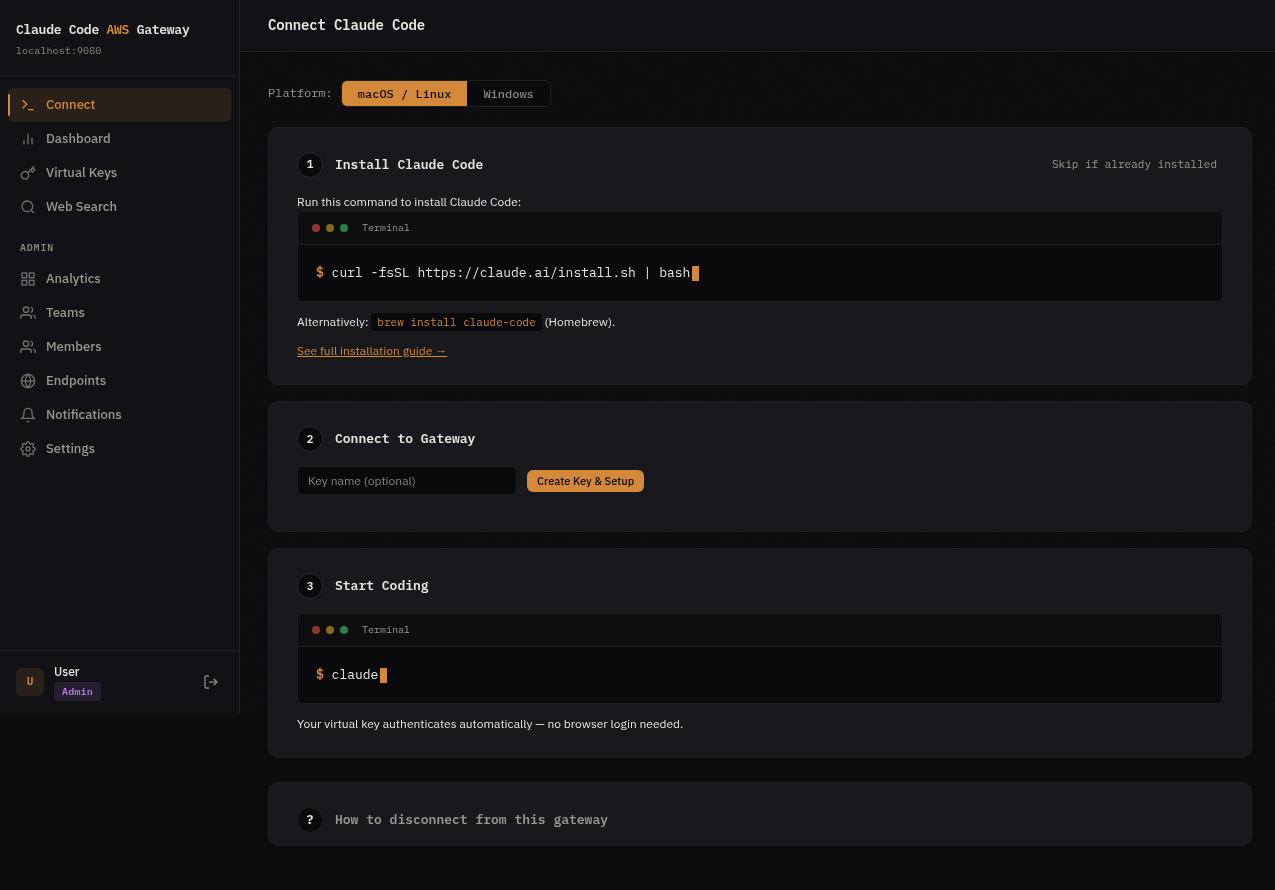
Log in to the admin portal at http://localhost:8080/portal and navigate to the Connect page. Developers get a single command that installs Claude Code (if needed), creates an API key, and configures the gateway connection — no manual env vars or config files.
curl -fsSL https://your-gateway/setup | sh # one command, fully configured
Features
API Translation
/v1/messagesand/v1/messages/count_tokensendpoints- SSE event stream translation (Bedrock binary stream to Anthropic SSE format)
- Automatic model ID mapping between Anthropic and Bedrock identifiers
- Beta flag allowlisting (filters flags that Bedrock does not accept)
cache_controlfield passthrough for Bedrock- Web search interception with per-user configurable providers (DuckDuckGo, Tavily, Serper, or custom)
Multi-Endpoint Routing
- Route requests across multiple AWS accounts, regions, or inference profiles from a single gateway
- Assign endpoints to teams with per-team routing strategies (sticky user, primary/fallback, round robin)
- Cross-account access via STS AssumeRole with external ID support
- Automatic failover on 429/5xx with health tracking per endpoint
- Sticky user routing preserves prompt cache affinity across conversations
Multi-User Management
- Virtual API keys: issue and revoke keys per user or team
- Teams: group users with shared budgets and rate limits
- Budgets: per-key and per-team spending limits with notification webhooks
- Rate limiting: per-key sliding window rate limiter
- Spend tracking: async batch writes to Postgres with per-key analytics
Authentication
Three-tier authentication for different use cases:
- Admin credentials: username/password for initial setup (
ADMIN_USERNAME/ADMIN_PASSWORD) - Virtual API keys: database-backed keys for programmatic access
- OIDC SSO: JWT validation with any compliant identity provider
Supported OIDC providers include Okta, Azure AD, Google Workspace, Auth0, Keycloak, and any provider with a .well-known/openid-configuration endpoint. Multiple providers can be active at the same time.
Admin Portal
A built-in single-page application at /portal for:
- Key creation and management
- Team administration
- Identity provider configuration
- Gateway settings
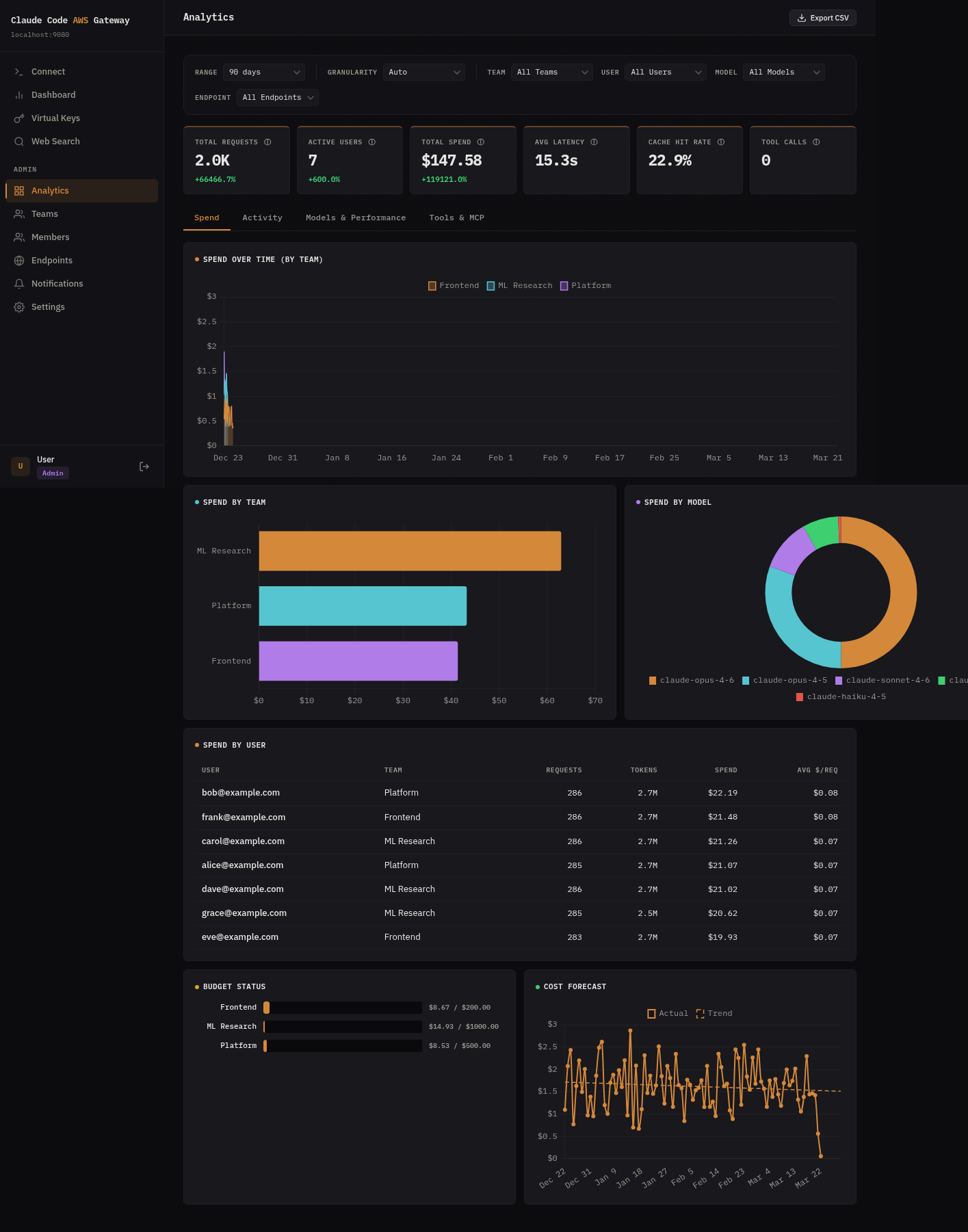
- Analytics dashboard with 4 tabs:
- Spend: timeseries by team, spend by team/model/user, budget status, OLS cost forecast
- Activity: active users over time (new vs returning), hourly request heatmap
- Models & Performance: model mix, latency percentiles (p50/p95/p99), cache hit rate, token breakdown, endpoint utilization
- Tools & MCP: tool call totals, MCP server usage, top tools
- Multi-select filters (team, user, model, endpoint) with time range and granularity control
- CSV export of filtered analytics data
Notifications & Integrations
- Budget alerts, rate limit events, and system notifications delivered to your tools
- Webhook: POST to any URL (Slack, PagerDuty, custom endpoints)
- SNS: Publish to your own AWS SNS topic for fan-out to email, Lambda, SQS, etc.
- EventBridge: Emit structured events to your own event bus for custom routing rules
- Configure and test destinations from the admin portal — no config files needed
Observability
- Prometheus metrics at
/metrics - Optional OTLP export via gRPC
- Structured logging with configurable log levels
Configuration
CCAG is configured through environment variables:
| Variable | Default | Description |
|---|---|---|
PROXY_HOST |
127.0.0.1 |
Listen address |
PROXY_PORT |
8080 |
Listen port |
DATABASE_URL |
Postgres connection URL (required) | |
ADMIN_USERNAME |
admin |
Bootstrap admin username |
ADMIN_PASSWORD |
admin |
Bootstrap admin password |
ADMIN_USERS |
Comma-separated OIDC subjects auto-provisioned as admin | |
OIDC_ISSUER |
OIDC issuer URL for SSO | |
OIDC_AUDIENCE |
Expected JWT audience claim | |
OIDC_JWKS_URL |
Override JWKS endpoint (auto-discovered from issuer by default) | |
RUST_LOG |
info |
Log level (debug for request body logging) |
OTEL_EXPORTER_OTLP_ENDPOINT |
OTLP gRPC endpoint for metrics export | |
BUDGET_NOTIFICATION_URL |
Webhook URL or SNS topic ARN for budget alerts |
See docs/configuration.md for the full reference including TLS, database, and notification settings.
Model Routing
Bedrock model IDs are resolved automatically from the AWS SDK’s configured region.
| AWS Region | Inference Profile |
|---|---|
us-*, ca-* |
US cross-region |
eu-* |
EU cross-region |
ap-southeast-2, ap-southeast-4 |
Australia |
ap-*, me-* |
Asia Pacific |
us-gov-* |
GovCloud |
Custom model mappings can also be configured through the admin portal.
Development
Build and test
make build               # Build gateway + CLI
make test                # Unit tests
make lint                # Format check + clippy
make check               # All checks (what CI runs)
make test-integration    # Integration tests (requires Docker)
Project structure
src/
  main.rs              Entry point, startup, cache poll loop
  api/
    handlers.rs        HTTP handlers (messages, count_tokens, health)
    admin.rs           Admin API (keys, teams, users, spend, IDPs, settings, analytics)
  config/mod.rs        GatewayConfig, routing prefix auto-detection
  proxy/mod.rs         Shared gateway state
  auth/
    mod.rs             In-memory key cache, key validation
    oidc.rs            Multi-IDP OIDC JWT validation, JWKS caching
  ratelimit/mod.rs     Per-key sliding window rate limiter
  db/                  Postgres pool, migrations, CRUD operations
    org_analytics.rs   Cross-org analytics queries (~20 functions)
  spend/mod.rs         Async spend tracker (buffer + flush loop)
  telemetry/mod.rs     Prometheus metrics, OTLP export
  translate/
    models.rs          Model ID mapping (Anthropic <-> Bedrock)
    request.rs         Request translation
    response.rs        Response normalization
    streaming.rs       SSE event formatting
  websearch/mod.rs     DuckDuckGo web search interception
static/index.html     Embedded admin portal SPA
infra/                 AWS CDK (TypeScript) for ECS Fargate + RDS
migrations/            Postgres schema migrations
Tech stack
- Language: Rust (axum + tokio)
- AWS SDK: aws-sdk-bedrockruntime
- Database: PostgreSQL with sqlx
- Infrastructure: AWS CDK (TypeScript), ECS Fargate (ARM64), RDS, ALB
- Admin portal: Vanilla HTML/JS SPA embedded at compile time
FAQ
How is this different from using CLAUDE_CODE_USE_BEDROCK=1?
Setting CLAUDE_CODE_USE_BEDROCK=1 connects Claude Code to Bedrock directly, identifying it as a Bedrock client. In this mode, extended thinking and some tool use features are not available. CCAG presents as the Anthropic API (ANTHROPIC_BASE_URL), enabling these features while inference runs through Bedrock in your AWS account.
What features does CCAG provide beyond direct Bedrock?
Extended thinking, web search (with per-user configurable providers: DuckDuckGo, Tavily, Serper, or custom), and complete tool use support. CCAG also adds team management features not available in direct Bedrock mode: virtual API keys, per-user/team budgets, rate limiting, OIDC SSO, and an analytics dashboard.
What OIDC providers are supported?
Any provider that exposes a .well-known/openid-configuration endpoint: Okta, Azure AD (Entra ID), Google Workspace, Auth0, Keycloak, AWS IAM Identity Center, and others. Multiple providers can be active at the same time. Each is configured as a separate identity provider in the admin portal or via the OIDC_ISSUER environment variable.
Can I use multiple AWS accounts or regions?
Yes. A single CCAG instance can route to multiple Bedrock endpoints across different AWS accounts and regions. Configure endpoints through the admin portal or API, then assign them to teams with routing strategies (sticky user, primary/fallback, or round robin). Cross-account access is supported via STS AssumeRole. See docs/endpoints.md for details.
What is the latency overhead?
CCAG adds 1-5ms for request translation and response normalization. When deployed in the same region as Bedrock, network round-trip to Bedrock is under 1ms. Streaming responses are forwarded as they arrive with no buffering.
How do I upgrade?
Pre-built images and binaries are published to GitHub Releases on every release. No compilation required.
- Docker Compose:
docker compose pull && docker compose up -d(or pin withCCAG_VERSION=1.0.2) - CDK:
npx cdk deploy -c environment=prod -c imageTag=1.0.2 - CLI:
ccag update
Database migrations run automatically on startup. See docs/upgrading.md for details.
Can I use this with Claude Code in VS Code or JetBrains?
Yes. Claude Code extensions for VS Code and JetBrains use the same underlying CLI. Set ANTHROPIC_BASE_URL in your Claude Code settings to point to your CCAG instance.
What models are supported?
Claude 4+ models on Bedrock are supported. Model IDs are translated automatically: use Anthropic-style names (e.g., claude-sonnet-4-20250514) and CCAG maps them to the Bedrock inference profile for your region. Custom mappings can be configured through the admin portal.
How does web search work?
Anthropic’s web_search tool is a server-side feature that Bedrock does not implement. When Claude Code sends a request containing a web_search tool use, CCAG intercepts it, executes the search via DuckDuckGo, and returns the results in Anthropic’s server_tool_use/web_search_tool_result format.
Roadmap
- MCP server — manage CCAG as an MCP server alongside the CLI
- Custom guardrails — configurable input/output validation rules beyond built-in detection
- SMTP notifications — email delivery for budget alerts without requiring SNS
See GitHub Discussions to suggest features or vote on priorities.